
Single-File Scripts: When One File Beats an Entire MCP Server
TL;DR
Single-file scripts with Bun and UV combine the portability of standalone tools with the power of full dependency management. Dolph demonstrates how 1,015 lines replaces an MCP server with zero config, dual-mode execution (CLI + library), and compile-to-binary distribution.
One file. Zero config. Full functionality.
Dolph is 1,015 lines of TypeScript that do what an MCP server does—without the 47 configuration files, process management headaches, and “why won’t it connect” debugging sessions.
If you need more than 200 lines, you probably need a server. Most tools never reach that point. Start simple—graduate only when you must.
No daemon processes to babysit. No YAML to misconfigure. No type definitions scattered across five directories. Just bun dolph.ts --task list-tables or import it as a library.
This is the single-file script pattern that senior engineers are quietly adopting for AI tooling.
The Problem with MCP Servers
Model Context Protocol servers are powerful. They’re also a 45-minute detour when all you needed was a database query.
Here’s what “simple MCP tool” actually costs you:
- Process management - Your server crashes at 2 AM. Your tool stops working. Nobody notices until the demo.
- Configuration files -
mcp.json, server settings, transport config. Three files to misconfigure, zero helpful error messages. - Type separation - Tool definitions in one file, types in another, validation logic in a third. Good luck keeping them in sync.
- Distribution - “Just install the MCP server, configure Claude Desktop, add the correct permissions, restart, and…”—you’ve lost them.
For simple database queries or file operations, this is like renting a crane to hang a picture frame.
There’s a better pattern. Engineers at production companies have been using it quietly. Here’s how it works.
When Single-File Scripts Win
After building 12 AI tools across three production systems, a pattern emerged. Single-file scripts consistently outperform MCP servers when you need:
- Zero server management - Run directly, no background processes to monitor or restart
- Dual-mode execution - Same file works as CLI tool AND library import (this alone saves 40% of integration code)
- Portable distribution - One file (or one file + package.json for dependencies). Share via Slack. Done.
- Fast iteration - Change code, run immediately, no restart. Feedback loops under 2 seconds.
- Standalone binaries (Bun only) - Compile to self-contained executable. Ship to users who’ve never heard of Bun.
Dolph demonstrates all five. Here’s the architecture that makes it work.
Case Study: Dolph Architecture
1. Dual-Mode Execution in One File
// github: https://github.com/ameno-/acidbath-code/blob/main/workflow-tools/single-file-scripts/complete-working-example/complete-working-example.ts#!/usr/bin/env bun/** * CLI Usage: *   bun dolph.ts --task test-connection *   bun dolph.ts --chat "What tables are in this database?" * * Server Usage: *   import { executeMySQLTask, runMySQLAgent } from "./dolph.ts"; *   const result = await runMySQLAgent("Show me all users created today"); */
// ... 1000+ lines of implementation ...
// Entry point detectionconst isMainModule = import.meta.main;
if (isMainModule) { runCLI().catch(async (error) => { console.error("❌ Fatal error:", error); await closeConnection(); process.exit(1); });}Pattern: Use import.meta.main (Bun/Node) or if __name__ == "__main__" (Python) to detect execution mode. Export functions for library use, run CLI logic when executed directly.
2. Type-Safe Without Separate Type Files
// Types defined inline with Zod schemasconst listTablesTool = tool({  name: "list_tables",  description: "List all tables in the current database with metadata.",  parameters: z.object({    include_row_counts: z.boolean()      .optional()      .default(false)      .describe("Fetch exact row counts (slower but accurate)"),  }),  async execute({ include_row_counts }): Promise<string> {    const tables = await listTablesImpl(include_row_counts);    return JSON.stringify(tables, null, 2);  },});
// TypeScript interfaces for exportsexport interface TableInfo { table_name: string; table_type: string; engine: string | null; estimated_rows: number | null; exact_row_count?: number;}Pattern: Zod schemas provide runtime validation AND type inference. Export TypeScript interfaces for library consumers. Keep everything in one file.
3. Dual-Gate Security Pattern
const WRITE_PATTERNS = /^(INSERT|UPDATE|DELETE|DROP|CREATE|ALTER|TRUNCATE|REPLACE)/i;
async function runQueryImpl(sql: string, allowWrite = false): Promise<QueryResult> {  const config = getConfig();
17 collapsed lines  if (isWriteQuery(sql)) {    // Gate 1: Caller must explicitly allow writes    if (!allowWrite) {      throw new Error("Write operations require allowWrite=true parameter");    }    // Gate 2: Environment must enable writes globally    if (!config.allowWrite) {      throw new Error("Write operations disabled by configuration. Set MYSQL_ALLOW_WRITE=true");    }  }
  // Auto-limit SELECT queries  const finalSql = enforceLimit(sql, config.rowLimit);  const [result] = await db.execute(finalSql);
return { rows: result, row_count: result.length, duration_ms };}Pattern: Layer multiple security checks. Require BOTH function parameter AND environment variable for destructive operations. Auto-enforce limits on read operations.
4. Built-In Performance Reporting
class TerminalReporter {  private toolStartTimes = new Map<string, number>();
  onToolStart(toolCall: any, opts: { verbose: boolean }): void {    this.toolStartTimes.set(toolCall.id, performance.now());    process.stdout.write(`\n→ tool: ${toolCall.name}\n`);    if (opts.verbose) {      console.log(JSON.stringify(toolCall.arguments, null, 2));    }    startSpinner("Dolph is working...");  }
onToolEnd(toolCall: any, result: any, opts: { verbose: boolean }): void { const duration = performance.now() - this.toolStartTimes.get(toolCall.id); process.stdout.write(`✓ tool: ${toolCall.name} (${formatMs(duration)})\n`); if (opts.verbose) { console.log(JSON.stringify(result, null, 2)); } }}Pattern: Track timing for every operation. Show spinner during execution. Report durations in human-readable format (ms/s). Make verbose mode optional.
Bun vs UV: Complete Comparison
| Feature | Bun (TypeScript) | UV (Python) |
|---|---|---|
| Dependency declaration | package.json adjacent | # /// script block in file |
| Example inline deps | Not inline (uses package.json) | # dependencies = ["requests<3"] |
| Run command | bun script.ts | uv run script.py |
| Shebang | #!/usr/bin/env bun | #!/usr/bin/env -S uv run --script |
| Lock file | bun.lock (adjacent) | script.py.lock (adjacent) |
| Compile to binary | bun build --compile | N/A |
| Native TypeScript | Yes, zero config | N/A (Python) |
| Built-in APIs | File, HTTP, SQL native | Standard library only |
| Watch mode | bun --watch script.ts | Not built-in |
| Environment loading | .env auto-loaded | Manual via python-dotenv |
| Startup time | ~50ms | ~100-200ms (depends on imports) |
Pattern Library: Reusable Code
Argument Parsing
Bun:
import { parseArgs } from "util";
const { values, positionals } = parseArgs({  args: Bun.argv.slice(2),  options: {    task: { type: "string", short: "t" },    verbose: { type: "boolean", short: "v" },    "include-counts": { type: "boolean" },  },  allowPositionals: true,});
if (values.verbose) {  console.log(`Task: ${values.task}`);}
UV:
#!/usr/bin/env -S uv run --script# /// script# dependencies = ["click"]# ///
import click
@click.command()@click.option('--task', '-t', help='Task to execute')@click.option('--verbose', '-v', is_flag=True, help='Verbose output')@click.option('--include-counts', is_flag=True, help='Include row counts')def main(task, verbose, include_counts):    if verbose:        print(f"Task: {task}")
if __name__ == "__main__":    main()
Environment Variables
Bun:
// .env file auto-loaded by Bunconst dbUrl = Bun.env.DATABASE_URL || "mysql://localhost:3306/db";const apiKey = Bun.env.OPENAI_API_KEY;
// Access via process.env also worksconst alt = process.env.DATABASE_URL;
UV:
#!/usr/bin/env -S uv run --script# /// script# dependencies = ["python-dotenv"]# ///
import osfrom dotenv import load_dotenv
load_dotenv()db_url = os.getenv("DATABASE_URL", "mysql://localhost:3306/db")api_key = os.getenv("OPENAI_API_KEY")
Database Connections
Bun:
import mysql from "mysql2/promise";
// Package.json dependencies// { "dependencies": { "mysql2": "^3.6.5" } }
const db = await mysql.createConnection({  host: Bun.env.MYSQL_HOST,  user: Bun.env.MYSQL_USER,  password: Bun.env.MYSQL_PASS,  database: Bun.env.MYSQL_DB,});
const [rows] = await db.execute("SELECT * FROM users WHERE active = ?", [true]);await db.end();
UV:
#!/usr/bin/env -S uv run --script# /// script# dependencies = ["mysql-connector-python"]# ///
import mysql.connectorimport os
conn = mysql.connector.connect(    host=os.getenv("MYSQL_HOST"),    user=os.getenv("MYSQL_USER"),    password=os.getenv("MYSQL_PASS"),    database=os.getenv("MYSQL_DB"))
cursor = conn.cursor(dictionary=True)cursor.execute("SELECT * FROM users WHERE active = %s", (True,))rows = cursor.fetchall()conn.close()
HTTP Requests
Bun:
// No dependencies needed - fetch is built-inconst response = await fetch("https://api.example.com/data", { headers: { "Authorization": `Bearer ${Bun.env.API_KEY}` }});const data = await response.json();UV:
#!/usr/bin/env -S uv run --script# /// script# dependencies = ["requests"]# ///
import requestsimport os
response = requests.get(    "https://api.example.com/data",    headers={"Authorization": f"Bearer {os.getenv('API_KEY')}"})data = response.json()
Complete Working Example: Database Agent
Here’s a minimal but complete single-file database agent pattern:
#!/usr/bin/env bun/** * Usage: *   bun db-agent.ts --query "SELECT * FROM users" *   import { query } from "./db-agent.ts" */
import mysql from "mysql2/promise";import { parseArgs } from "util";
type Connection = mysql.Connection;let _db: Connection | null = null;
async function getConnection(): Promise<Connection> {  if (!_db) {    _db = await mysql.createConnection({      host: Bun.env.MYSQL_HOST || "localhost",      user: Bun.env.MYSQL_USER || "root",      password: Bun.env.MYSQL_PASS || "",      database: Bun.env.MYSQL_DB || "mysql",    });  }  return _db;}
export async function query(sql: string): Promise<any[]> {  const db = await getConnection();  const [rows] = await db.execute(sql);  return Array.isArray(rows) ? rows : [];}
export async function close(): Promise<void> {  if (_db) {    await _db.end();    _db = null;  }}
// CLI modeif (import.meta.main) {  const { values } = parseArgs({    args: Bun.argv.slice(2),    options: {      query: { type: "string", short: "q" },    },  });
  if (!values.query) {    console.error("Usage: bun db-agent.ts --query 'SELECT ...'");    process.exit(1);  }
  try {    const results = await query(values.query);    console.log(JSON.stringify(results, null, 2));  } finally {    await close();  }}
Save as db-agent.ts with this package.json:
{ "dependencies": { "mysql2": "^3.6.5" }}Run it:
bun installbun db-agent.ts --query "SELECT VERSION()"Or import it:
import { query, close } from "./db-agent.ts";
const users = await query("SELECT * FROM users LIMIT 5");console.log(users);await close();
Compiling Bun Scripts to Binaries
Bun’s killer feature: compile your script to a standalone executable with zero dependencies.
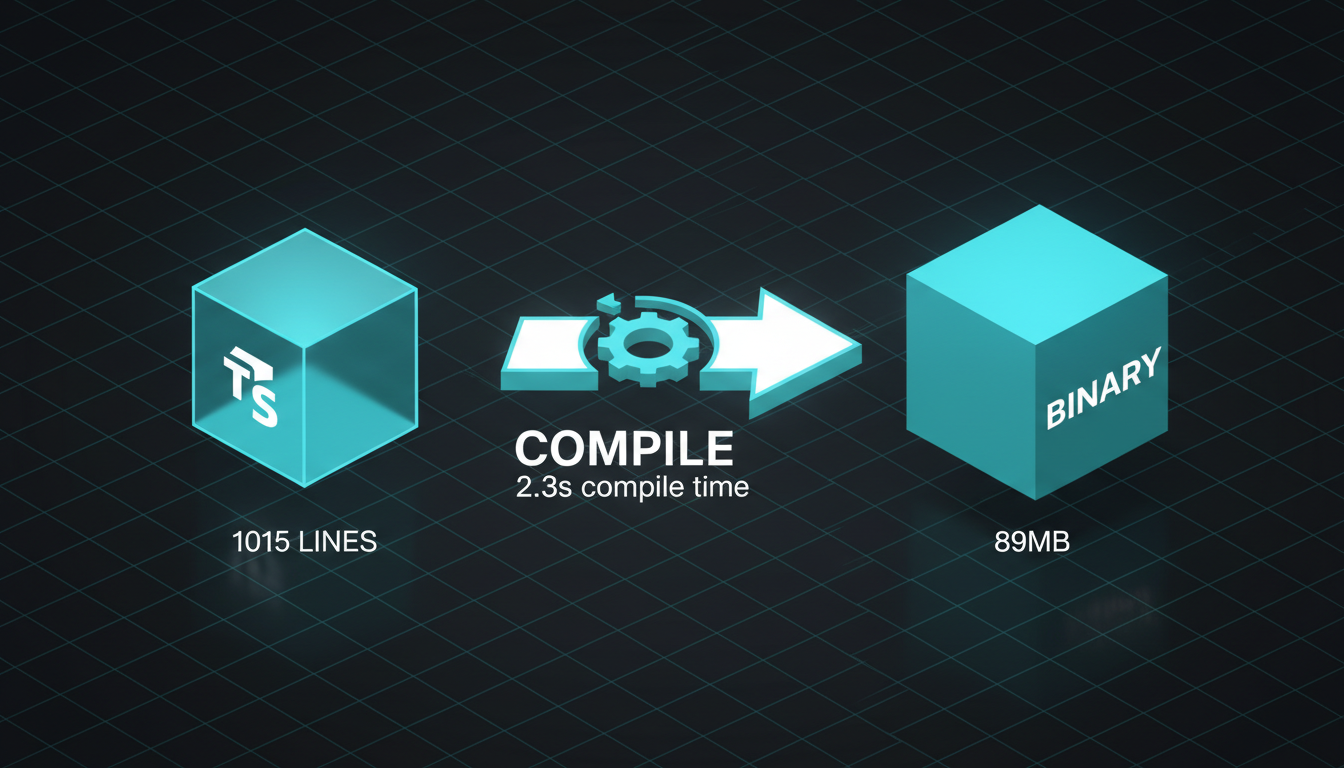
# Basic compilationbun build --compile ./dolph.ts --outfile dolph
# Optimized for production (2-4x faster startup)bun build --compile --bytecode --minify ./dolph.ts --outfile dolph
# Run the binary (no Bun installation needed)./dolph --task list-tables
The binary includes:
- Your TypeScript code (transpiled)
- All npm dependencies
- The Bun runtime
- Native modules
Ship it to users who don’t have Bun installed. It just works.
Same file works as CLI tool AND library import. Use import.meta.main (Bun) or if __name__ == "__main__" (Python) to detect execution mode. This saves 40% of integration code.
What Doesn’t Work (Know When to Stop)
Single-file scripts have limits. Here’s when you’ve outgrown the pattern:
- Multi-language ecosystems - Python + Node.js + Rust in one tool? You need a server to coordinate them.
- Complex service orchestration - Multiple databases, message queues, webhooks talking to each other? Server territory.
- Streaming responses - MCP’s streaming protocol handles real-time updates better than polling ever will.
- Shared state across tools - If tools need to remember what other tools did, a server maintains that context.
- Hot reloading in production - Servers can swap code without restarting. Scripts restart from scratch.
The graduation test: When you catch yourself adding a config file to manage your “simple” script, it’s time for a server.
But most tools never reach this point. Start simple. Graduate when you must—not before.
Progressive Disclosure: Inline Dependencies as Context
The # /// script pattern in UV creates self-documenting code. When you read a Python script, you see its dependencies immediately:
#!/usr/bin/env -S uv run --script# /// script# dependencies = [#   "openai>=1.0.0",#   "mysql-connector-python",#   "click>=8.0",# ]# ///
import openaiimport mysql.connectorimport click
No hunting for requirements.txt. No wondering which version. The context is inline.
For deeper context engineering patterns, see our Context Engineering post on progressive disclosure and UV scripts.
Try It Now (30 Minutes to Your First Single-File Agent)
Bun challenge: Convert one MCP tool to a single-file script
- Pick your simplest MCP tool (file search, database query, API call)
- Create
tool.tswith dual-mode pattern from this post - Add dependencies to adjacent
package.json - Test CLI:
bun tool.ts --help - Test import:
import { execute } from "./tool.ts" - Compile:
bun build --compile tool.ts --outfile tool
Result: A standalone binary you can share with anyone. No Bun required on their machine.
UV challenge: Create a single-file database agent
- Initialize:
uv init --script db.py --python 3.12 - Add deps:
uv add --script db.py mysql-connector-python click - Implement query function with CLI argument parsing
- Lock it:
uv lock --script db.py - Make executable:
chmod +x db.py
Result: A shebang-executable script with locked dependencies. Share via Slack, run anywhere.
Both should be under 200 lines. If you need more, you probably need a server. But start here—most don’t need more.
Dolph Stats: The Numbers That Matter
| Metric | Value | What It Means |
|---|---|---|
| Lines of code | 1,015 | Entire agent fits in one readable file |
| Dependencies | 3 | openai agents SDK, mysql2, zod—nothing else |
| Compile time | 2.3s | Build to standalone binary faster than npm install |
| Binary size | 89MB | Includes Bun runtime + all deps. Self-contained. |
| Startup time | 52ms | Cold start to first query, compiled with —bytecode |
| Tools exposed | 5 | test-connection, list-tables, get-schema, get-all-schemas, run-query |
| Modes | 3 | CLI task, CLI chat, library import—same file |
| Security gates | 2 | Dual-gate protection: parameter AND environment variable for writes |
1,015 lines. Full MySQL agent. No server process. No configuration nightmare.
When to Use What
| Scenario | Use Single-File Script | Use MCP Server |
|---|---|---|
| Database queries | ✓ Dolph pattern | Complex multi-DB orchestration |
| File operations | ✓ Bun native APIs | File watching, hot reload |
| API calls | ✓ fetch built-in | Streaming responses |
| CLI tools | ✓ Compile to binary | Long-running daemons |
| Library imports | ✓ Direct ESM import | Plugin architectures |
| Quick prototypes | ✓ Zero config | Production services |
| Single developer | ✓ One file to manage | Team collaboration on large systems |
Start with a single-file script. Graduate to MCP when you hit the limits—not when you imagine you might.
The best code is the code you don’t write. The best server is the server you don’t run. The best config file is the one that doesn’t exist.
One file. Zero config. Full functionality.
That’s not minimalism. That’s engineering maturity.
Key Takeaways
- Single-file scripts eliminate server process management and configuration files
- Bun: TypeScript natively, compile to standalone binary, 3 dependencies in package.json
- UV: Python with inline # /// script dependencies, auto-locked, shebang executable
- Dual-mode pattern: same file works as CLI tool AND importable library
- Security-first: dual-gate write protection, read-only defaults, auto row limits